Combine Multiple M3 API Calls into a Single REST Call
The problem
Many M3 customers integrate with other systems, but M3's REST APIs are not stateless — getting a complete picture of a single record often means calling several transactions in sequence. For example, to retrieve a full sales order you need:
OIS100MI/GetOrderHeadOIS100MI/GetOrderValueOIS100MI/LstHeadTextOIS100MI/LstOrderChargeOIS100MI/GetAddressfor the delivery addressOIS100MI/GetAddressfor the customer addressOIS100MI/GetAddressfor the invoice addressOIS100MI/LstLinefor the order lines
That's eight API calls just to read one order. For a team evaluating whether to integrate with M3, that complexity can be a deal-breaker — and even once they commit, cryptic M3 field names like NTAM, CRD0, and CUCD add further friction.
The solution
A Vince Platform workflow can make all of these calls in a single request and return the combined result as one clean, human-readable JSON document.
Workflows can be triggered and called synchronously, returning the output of their last step as the response (see Step 3 below). Since a workflow can also transform the M3 output along the way, callers get back a readable structure instead of raw M3 field codes — effectively turning the workflow into your own purpose-built API.
Prerequisites
-
A Connection to your M3 environment — see Connecting to Infor M3 if one doesn't exist yet.

-
Familiarity with the REST API component and the Transform component.
Step 1 — Read all the order data in one step
Since all the required transactions belong to the same M3 program (OIS100MI), they can be read in a single REST API step that calls M3's bulk REST API endpoint, using the M3 Connection from the prerequisites.
The request needs an order number as input. Rather than hard-coding it, pass it in as a variable so the workflow can be reused for any order: reference {{ body.orderNumber }} wherever the order number is needed, and Vince Platform fills it in from the request body at execution time — see Using data from earlier steps for how templating works in the REST API component.
Configure the step's settings as follows:
| Setting | Value |
|---|---|
| Use connection | On |
| Connection | Your M3 connection from the prerequisites |
| Endpoint URL | https://mingle-ionapi.eu1.inforcloudsuite.com/VINCE_DEM/M3/m3api-rest/v2/execute |
| HTTP Method | post |
Under Headers, select Add header and enter:
| Key | Value |
|---|---|
content-type | application/json |
Under Request body, switch to the Body tab and enter:
{
  "program": "OIS100MI",
  "cono": 790,
  "transactions": [
    { "transaction": "GetOrderHead", "record": { "ORNO": "{{ body.orderNumber }}" }, "selectedColumns": ["CUNO", "ORNO", "ORTP", "ORST", "ORSL", "WHLO", "FACI", "ORDT", "RLDT", "TEPY", "TEDL", "MODL", "TEPA", "OREF", "CUOR", "YREF"] },
      { "transaction": "GetOrderValue", "record": { "ORNO": "{{ body.orderNumber }}" } },
      { "transaction": "LstOrderCharge", "record": { "ORNO": "{{ body.orderNumber }}" } },
      { "transaction": "GetAddress", "record": { "ORNO": "{{ body.orderNumber }}", "ADRT": "01" } },
      { "transaction": "GetAddress", "record": { "ORNO": "{{ body.orderNumber }}", "ADRT": "02" } },
      { "transaction": "GetAddress", "record": { "ORNO": "{{ body.orderNumber }}", "ADRT": "03" } },
      { "transaction": "LstLine", "record": { "ORNO": "{{ body.orderNumber }}" } }
  ]
}
The response is classic M3: structured, but not pretty. Every transaction comes back in the same result set — Get transactions return a single record, Lst transactions return multiple.
Step 2 — Reshape the response with Transform
Add a Transform step to turn the raw M3 output into a clean, predictable JSON structure using a JSONata expression.
(
  $root := $context.data.all.rest_api_1.body.results;
  $orderHead := $root[transaction="GetOrderHead"].records[0];
  $orderValue := $root[transaction="GetOrderValue"].records[0];
  $orderCharges := $root[transaction="LstOrderCharge"].records;
  $orderLines := $root[transaction="LstLine"].records;
  $orderAddr := $root[transaction="GetAddress"].records;

  /* utility function to generate an address */
  $formatAddress := function($addr, $type) {
    "type": $type,
    "name": $addr.CUNM,
    "addressLine1": $addr.CUA1,
    "addressLine2": $addr.CUA2,
    "addressLine3": $addr.CUA3,
    "addressLine4": $addr.CUA4,
    "city": $addr.TOWN,
    "zip": $addr.PONO,
    "countryCode": $addr.CSCD,
    "phone": $addr.PHNO,
    "contact": $addr.YREF
  };

  /* build the new output */
  {
    "orderNumber": $orderHead.ORNO,
    "orderDate": $substring($orderHead.ORDT,0,4) & "-" & $substring($orderHead.ORDT,4,2) & "-" & $substring($orderHead.ORDT,6,2),
    "deliveryDate": $substring($orderHead.RLDT,0,4) & "-" & $substring($orderHead.RLDT,4,2) & "-" & $substring($orderHead.RLDT,6,2),
    "paymentTerms": $orderHead.TEPY,
    "deliveryTerms": $orderHead.TEDL,
    "deliveryMethod": $orderHead.MODL,
    "ourReference": $orderHead.OREF,
    "customerOrderNumber": $orderHead.CUOR,
    "customerNumber": $orderHead.CUNO,
    "customerName": $orderAddr[1].CUNM,
    "statusLow": $number($orderHead.ORSL),
    "statusHigh": $number($orderHead.ORST),

    /* financials */
    "currencyCode": $orderValue.CUCD,
    "toPayAmount": $number($orderValue.TOAM ? $orderValue.TOAM : 0),
    "chargesAmount": $number($orderValue.EFAM ? $orderValue.EFAM : 0),
    "orderAmount": $number($orderValue.BRAM ? $orderValue.BRAM : 0),
    "taxAmount": $number($orderValue.VTAM ? $orderValue.VTAM : 0),
    "netAmount": $number($orderValue.NTAM ? $orderValue.NTAM : 0),

    /* charges */
    "charges": $orderCharges.{
      "deliveryNumber": DLIX,
      "chargeType": CRID,
      "description": CRD0,
      "amount": $number(PBAM ? PBAM : 0),
      "currencyCode": CUCD
    }[],

    /* addresses */
    "addresses": [
      $formatAddress($orderAddr[0], "delivery"),
      $formatAddress($orderAddr[1], "customer"),
      $formatAddress($orderAddr[2], "invoice")
    ],

    /* order lines */
    "lines": $orderLines.{
      /* combine line number and suffix */
      "lineNumber": $number(PONR) * 1000 + $number(POSX),
      "item": ITNO,
      "ean": ALWQ = 'EA13' ? POPN : null,
      "gtin": ALWQ = 'GTIN' ? POPN : null,
      "shortDescription": ITDS,
      "fullDescription": FUDS,
      "technicalDescription": TEDS,
      "requestedDate": $substring(DWDT,0,4) & "-" & $substring(DWDT,4,2) & "-" & $substring(DWDT,6,2),
      "confirmedDate": $substring(CODT,0,4) & "-" & $substring(CODT,4,2) & "-" & $substring(CODT,6,2),
      "fromWarehouse": WHLO,
      "status": $number(ORST),
      "orderedQuantity": $number(ORQA),
      "outstandingQuantity": $number(ORQA) - $number(DLQT),
      "quantityUom": ALUN,

      /* financials */
      "discountAmount": $number(DIA1) + $number(DIA2) + $number(DIA3) + $number(DIA4) + $number(DIA5) + $number(DIA6),
      "netLineAmount": $number(NLAM),
      "price": $number(SAPR),
      "netPrice": $number(NEPR)
    }[]
  }
)
This expression relies only on standard JSONata features: variable assignments, type casting, simple arithmetic, and a custom function. The result for order 0010000386 looks like this:
{
  "orderNumber": "0010000386",
  "orderDate": "2020-08-17",
  "deliveryDate": "2020-08-30",
  "paymentTerms": "N30",
  "deliveryTerms": "FOB",
  "deliveryMethod": "003",
  "ourReference": "Our reference",
  "customerOrderNumber": "2000000416",
  "customerNumber": "INTCUSTBBB",
  "customerName": "Internal Customer for DivBBB (Sales)",
  "statusLow": 66,
  "statusHigh": 66,
  "currencyCode": "SEK",
  "toPayAmount": 10062.5,
  "chargesAmount": 62.5,
  "orderAmount": 10000,
  "taxAmount": 0,
  "netAmount": 10000,
  "charges": [
    { "deliveryNumber": "228", "chargeType": "FC001", "description": "Freight charge example", "amount": 62.5, "currencyCode": "SEK" }
  ],
  "addresses": [
    { "type": "delivery", "name": "Our Company Number", "addressLine1": "Warehouse 901", "addressLine2": "Warehouse 901 Address 2", "addressLine3": "City ZIP", "addressLine4": "IE", "city": "City", "zip": "ZIP", "countryCode": "IE", "phone": "TELEPHONE 1", "contact": "Contact 1" },
    { "type": "customer", "name": "Internal Customer for DivBBB (Sales)", "addressLine1": "Internal Customer line 1", "addressLine2": "Internal Customer line 2", "addressLine3": "POSTCODE Göteborg", "addressLine4": "Sweden", "city": "Göteborg", "zip": "POSTCODE", "countryCode": "SE", "phone": "TELEPHONE 1", "contact": "Contact 1" },
    { "type": "invoice", "name": "Internal Customer for DivBBB (Sales)", "addressLine1": "Internal Customer line 1", "addressLine2": "Internal Customer line 2", "addressLine3": "POSTCODE Göteborg", "addressLine4": "Sweden", "city": "Göteborg", "zip": "POSTCODE", "countryCode": "SE", "phone": "TELEPHONE 1", "contact": "Contact 1" }
  ],
  "lines": [
    { "lineNumber": 1000, "item": "IS001", "ean": null, "gtin": null, "shortDescription": "Internal Sales Item 001", "technicalDescription": "Internal Sales Item 001", "requestedDate": "2020-08-30", "confirmedDate": "2020-08-31", "fromWarehouse": "001", "status": 66, "orderedQuantity": 100, "outstandingQuantity": 0, "quantityUom": "EA", "discountAmount": 0, "netLineAmount": 10000, "price": 100, "netPrice": 100 }
  ]
}
Step 3 — Call the workflow synchronously
To test the workflow as an API, call the synchronous workflow execution endpoint:
POST /live/workflows/{workflowId}/sync
The /sync suffix tells Vince Platform to wait for the workflow to finish and return its result, instead of just acknowledging that it started.
AWS API Gateway enforces a 29-second timeout, so the workflow must complete and return a response before that limit.
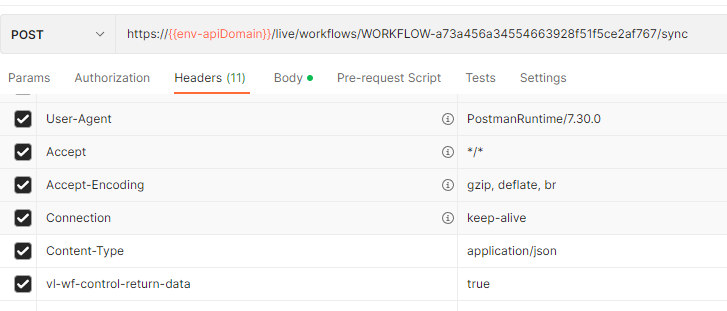
To get the transformed data back — rather than the full execution metadata — add this header to the request:
vl-wf-control-return-data: true
Send the order number as JSON in the request body:
{ "orderNumber": "0010000386" }
Testing with Postman
Here's how the header configuration looks in Postman:
And the full request and response:
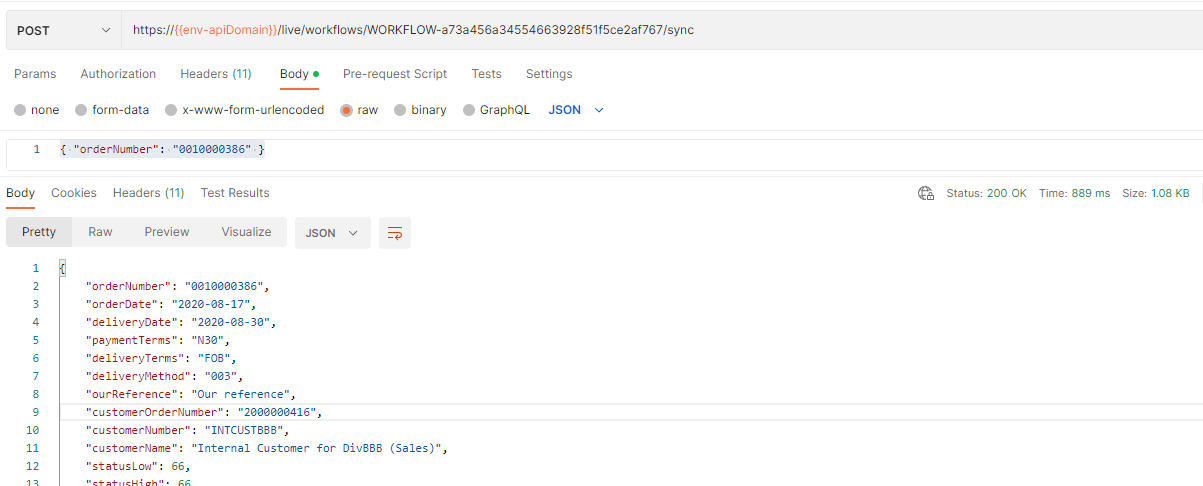
Response times can be slower the first time a workflow runs, since there may be a cold start behind the scenes.
Step 4 — Give it a human-readable URL with a Custom API endpoint
Calling https://api.vince.live/live/workflows/WORKFLOW-a73a456a34554663928f51f5ce2af767/sync works, but it's not something you'd want to hand to another team. If you build several of these workflow-backed APIs, tracking which workflow ID belongs to which workflow gets tricky fast.
Custom API endpoints let you wrap a workflow behind a short, human-readable URL. Endpoints are grouped under a basePath — for example m3 — with one endpoint per workflow underneath it.
Create the endpoint
POST /v1/custom-apis/control
{
  "endpoint": "sales-order",
  "tenantId": "TENANT-196886ffcb894a688405f0586872e9fa",
  "basePath": "m3",
  "config": {
    "target": {
      "resource": "WORKFLOW",
      "identifier": "WORKFLOW-a73a456a34554663928f51f5ce2af767",
      "parameters": { "vl-wf-control-return-data": true }
    },
    "source": {
      "contentTypes": ["application/json"],
      "httpMethod": "GET"
    }
  }
}
This results in a Custom API endpoint at:
GET /v1/custom-apis/live/m3/sales-order
Within the same m3 group you could add further endpoints, such as GET /v1/custom-apis/live/m3/purchase-order to fetch a full purchase order, or POST /v1/custom-apis/live/m3/sales-order to create a customer order.
Set up permissions
Custom API endpoints aren't yet exposed in the Access Management UI, so permissions are granted by updating the target role directly through the API.
First, fetch the role's current permissions:
GET /roles/{roleId}
{
  "roleName": "External API role",
  "permissions": [
    { "action": "*", "vrn": "vrn:TENANT-196886ffcb894a688405f0586872e9fa:fnd:workflow:Sales Order Workflow" },
    { "action": "*", "vrn": "vrn:TENANT-196886ffcb894a688405f0586872e9fa:fnd:workflow:Some other workflow" }
  ],
  "tenantId": "TENANT-196886ffcb894a688405f0586872e9fa",
  "roleId": "ROLE-0369a162d6ed47c298fe67d01fe6fac5"
}
Then send back the full permissions array — including the existing entries — with the new Custom API permission appended. PATCH /roles replaces the whole array, so omitting existing entries removes them.
Custom API permission names follow the pattern {basePath}_{endpoint} — for example m3_sales-order. Wildcards are supported, e.g. m3_*order.
PATCH /roles
{
  "permissions": [
    { "action": "*", "vrn": "vrn:TENANT-196886ffcb894a688405f0586872e9fa:fnd:workflow:Sales Order Workflow" },
    { "action": "*", "vrn": "vrn:TENANT-196886ffcb894a688405f0586872e9fa:fnd:workflow:Some other workflow" },
    { "action": "*", "vrn": "vrn:TENANT-196886ffcb894a688405f0586872e9fa:fnd:custom-api:m3_sales-order" }
  ],
  "tenantId": "TENANT-196886ffcb894a688405f0586872e9fa",
  "roleId": "ROLE-0369a162d6ed47c298fe67d01fe6fac5"
}
Call the Custom API endpoint
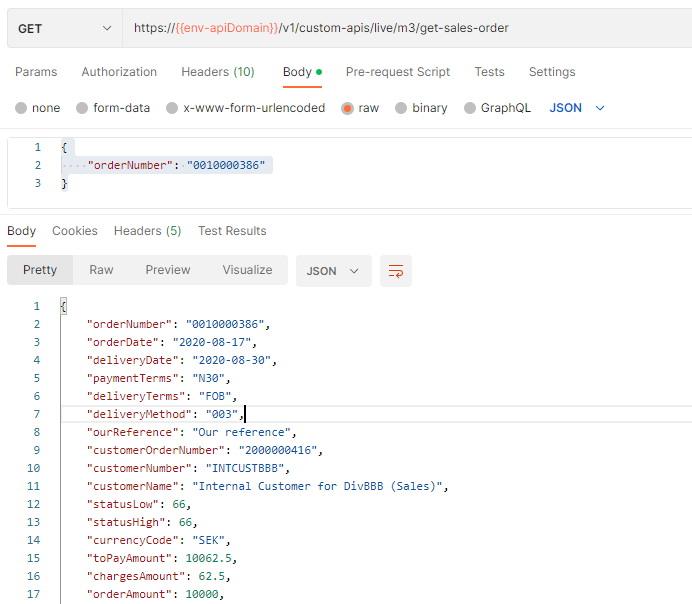
No extra header is needed this time — vl-wf-control-return-data is already baked into the endpoint configuration:
GET /v1/custom-apis/live/m3/sales-order
{ "orderNumber": "0010000386" }
The response is the same transformed order JSON as before:
Further reading
- Connections — manage the M3 connection used by the REST API step
- REST API component — full reference for the component used in Step 1
- Transform component — full reference for reshaping data with JSONata
- Roles — grant access to workflows and Custom API endpoints
- API Clients — authenticate external systems calling these endpoints